How to use CUDA Graphs
CUDA Graphs + torch.compile
CUDA Graphs capture a stable GPU execution path and replay it, which can reduce CPU launch overhead and improve execution stability in some workloads. In Cache-DiT example CLI, CUDA Graphs are enabled through torch.compile options {"triton.cudagraphs": True} or max-autotune mode, which automatically enables CUDA Graphs when capture conditions are met. Here is an End-to-End Python Example (same style as Cache-DiT usage):
import torch

# Enable compile + CUDA Graph through torch.compile options
pipe.transformer = torch.compile(pipe.transformer, options={"triton.cudagraphs": True})

# Enable compile + CUDA Graph through torch.compile max-autotune mode
# (which will automatically enable cudagraphs if constraints are satisfied)
pipe.transformer = torch.compile(pipe.transformer, mode="max-autotune")
Quick start for Cache-DiT example CLI: NVIDIA L20 x 1, FLUX.1-dev, 28 steps, 1024x1024.
python3 -m cache_dit.generate flux --compile --no-regional-compile
python3 -m cache_dit.generate flux --compile --cuda-graph --no-regional-compile
python3 -m cache_dit.generate flux --compile --no-regional-compile --float8-per-tensor
python3 -m cache_dit.generate flux --compile --no-regional-compile --float8-per-tensor --cuda-graph
First-run includes compile, warmup (2 times) and repeat (2 times); steady-state is after warmup. For FLUX.1-dev, we see a modest speedup in steady-state runs after enabling CUDA Graphs, which suggests that GPU execution is already efficient and CUDA Graphs are effectively reducing CPU launch overhead.
| FLUX.1-dev, compile (no CUDA Graphs) | compile + CUDA Graphs | compile (no CUDA Graphs) + float8-per-tensor | compile + CUDA Graphs + float8-per-tensor |
|---|---|---|---|
| 20.73s | 20.70s | 13.46s | 13.37s |
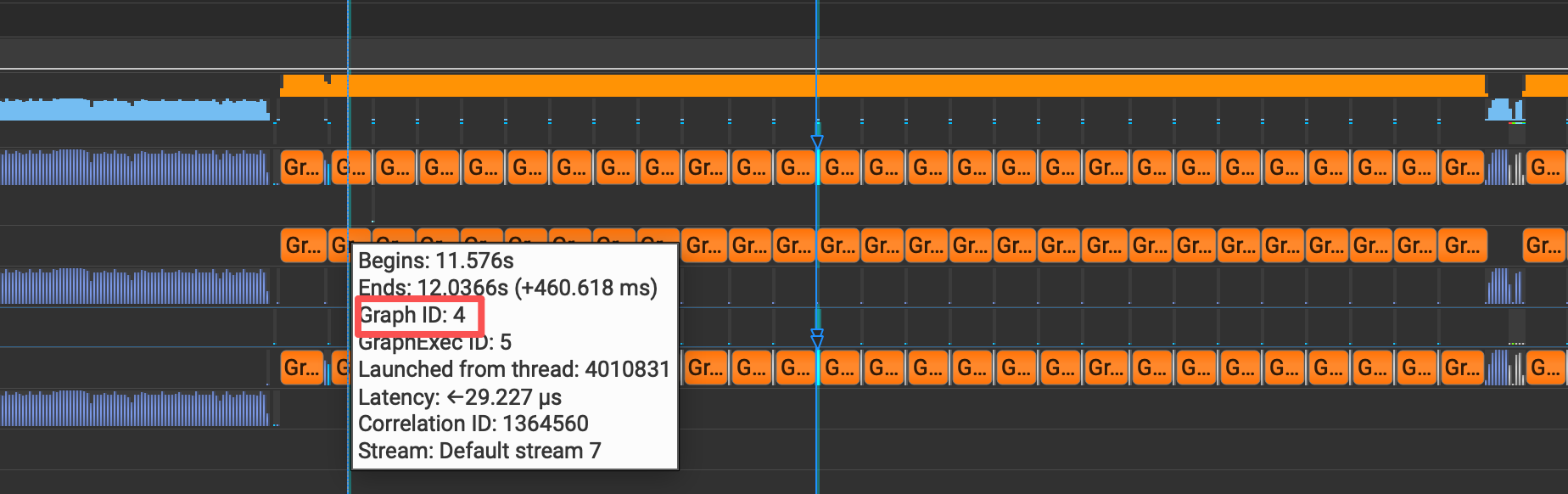
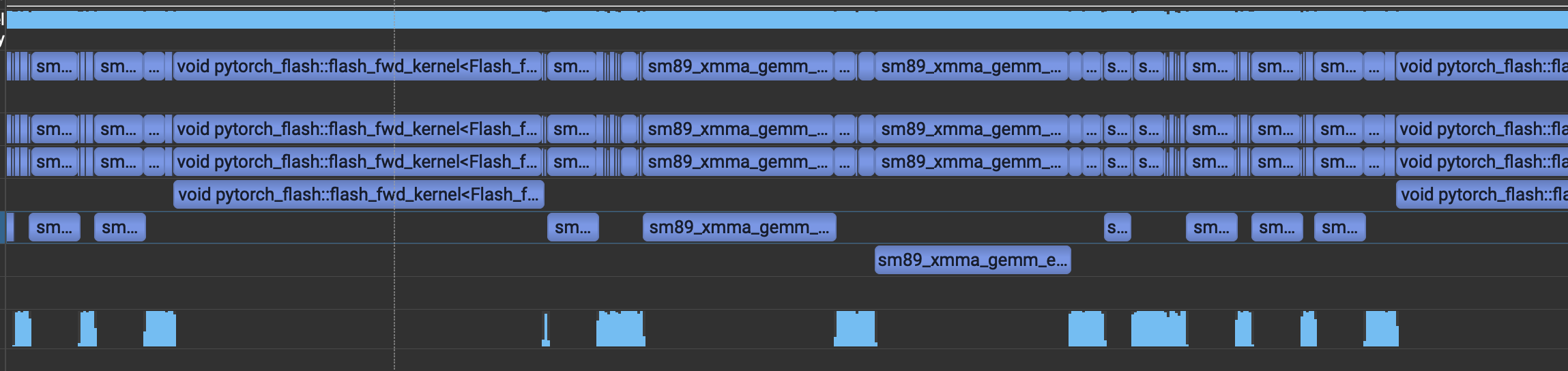
Nsys profiling confirms that CUDA Graphs significantly reduce the kernel launch overhead, which is consistent with the observed speedup. In the Nsight Systems timeline, we can see that with CUDA Graphs enabled, the process captured a graph once and then replayed it in subsequent iterations (top figure), while without CUDA Graphs, we see many individual kernel launches (bottom figure).
Command line options in Cache-DiT example CLI:
# Nsys profiling with CUDA Graphs
nsys profile --stats=true -t cuda,nvtx,osrt --cuda-graph-trace=graph \
  --force-overwrite=true --delay 100 -o flux_cuda_graph \
  python3 -m cache_dit.generate flux --compile \
  --no-regional-compile --steps 28 --float8-per-tensor \
  --cuda-graph
# Nsys profiling without CUDA Graphs
nsys profile --stats=true -t cuda,nvtx,osrt --force-overwrite=true \
  --delay 100 -o flux_no_cuda_graph \
  python3 -m cache_dit.generate flux --compile \
  --no-regional-compile --steps 28 --float8-per-tensor
FP8 Rowwise and CUDA Graphs
FP8 rowwise quantization can be combined with CUDA Graphs to further optimize transformer workloads. Cache-DiT provides an opaque FP8 scaled_mm path that is compatible with CUDA Graphs, ensuring stable execution and avoiding replay-overwrite and hang issues that can arise with float8 per-row quantization.
import torch
from cache_dit import QuantizeConfig
from cache_dit.quantization.torchao._scaled_mm import (
  enable_opaque_torchao_float8_scaled_mm,
)

# Enable opaque FP8 scaled_mm for stable CUDA Graphs execution
enable_opaque_torchao_float8_scaled_mm()

# Apply float8 per-row quantization to transformer modules
pipe.transformer = cache_dit.quantize(
  pipe.transformer,
  config=QuantizeConfig(quant_type="float8_per_row"),
)

# Enable compile + CUDA Graph through torch.compile options
pipe.transformer = torch.compile(pipe.transformer, options={"triton.cudagraphs": True})
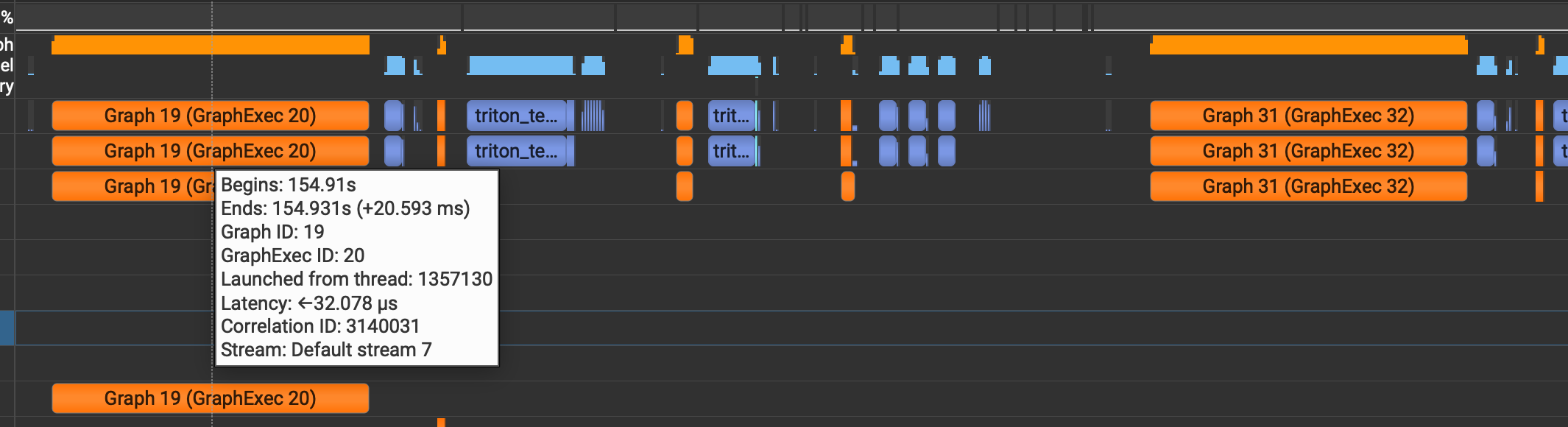
Please note that this temporarily workarounds will generate multiple separate CUDA Graphs due to the presence of non-CUDA-Graph-compatible kernels (for example, rowwise quantization kernels), so, it may not achieve the same level of speedup as the per-tensor quantization + CUDA Graphs path due to less stable capture assumptions and more frequent graph breaks in some cases. Disable CUDA Graphs for FP8 per-row quantization if you encounter performance regressions or stability issues.
Constraints & Troubleshooting
Click to expand common issues and constraints when using CUDA Graphs
1. Do not use regional compile with CUDA Graphs
When CUDA Graphs is enabled, repeated-block regional compilation (compile_repeated_blocks) can cause replay-overwrite issues in transformer loops (for example FLUX blocks).
Use full-module compile for transformer when enabling CUDA Graphs.
2. Dynamic shape is currently not recommended
CUDA Graphs generally expects stable shapes and stable execution paths.
- Do not enable
torch.compile(..., dynamic=True)when using CUDA Graphs. - In Cache-DiT example CLI, avoid
--force-compile-dynamictogether with--cuda-graph.
3. RuntimeError: accessing tensor output of CUDA Graphs that has been overwritten
Why it happens:
- A captured graph output is referenced after a later replay has already overwritten the same output buffer.
- This often appears when CUDA Graphs is combined with regional compile (
compile_repeated_blocks) in transformer loops.
Typical message:
"RuntimeError: Error: accessing tensor output of CUDAGraphs that has been overwritten by a subsequent run"
How to fix:
- Disable regional compile and compile the full transformer when using CUDA Graphs.
- Do not use
dynamic=True, and ensure stable input shapes. - If you invoke compiled modules manually in a loop, call
torch.compiler.cudagraph_mark_step_begin()before each model invocation.
Quick CLI check:
Use --compile --cuda-graph --no-regional-compile.
4. Graph breaks or repeated recompilation
Typical signals:
- Frequent recompilation logs.
- Throughput drops after enabling CUDA Graphs.
Why it happens:
- Dynamic shapes, changing control flow, or changing optional inputs between runs can invalidate capture assumptions.
How to fix:
- Keep inference settings fixed across runs (height/width/steps/batch size).
- Avoid
dynamic=Trueand avoid--force-compile-dynamicwith CUDA Graphs. - Keep optional branches stable (for example, consistently enable or disable ControlNet or IP-Adapter for a run).
5. CUDA Graphs enabled but little or no speedup
Possible reasons:
- Workload is already kernel-bound with low CPU launch overhead.
- First-run compile and warmup dominate short benchmark windows.
- Extra fallback or recompile events offset replay gains.
How to validate:
- Compare steady-state runs after warmup (not first-run latency).
- Keep benchmark setup identical (same prompt length, steps, resolution, and seed policy).
- Profile CPU launch overhead to confirm CUDA Graphs is the right optimization target.